BBlock

[ Lang: 简体中文 | English ]
🎵 Wow~ you can really play! Square Music Player.
A lightweight, simple music player—perfect for blogs and personal pages.
Demo
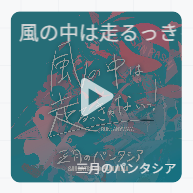
1. Let's Use It!
Expand for v1.x.x setup instructions
-
Include
bblock.(m.).cssin the page head, and includebblock.(m.).jsafter all<bblock></bblock>tags. -
Add a tag like this to your HTML:
<bblock style='display:none'>
 	{
 		"src":"<musicurl>",
 		"cover":"<musiccover>",
 		"title":"S.T.A.Y. (Delta Heavy Tribute)",
 		"artist":"Delta Heavy / Hans Zimmer",
 		"volume":20,
 		"time":0,
 		"loop":"false",
 		"float":"right"
 	}
</bblock>
Key Value Notes src Music URL Required cover Cover image URL Optional title Track title Optional artist Track artist Optional volume Volume Optional. Range: [0,100]. Default: 100 time Initial playback position Optional. In seconds loop Whether to loop playback Optional. Disabled by default float The CSS floatpropertyOptional -
Initialize players manually:
Loading
bblock.(m.).jsautomatically initializes all players wrapped in<bblock></bblock>tags on the page. For special cases, such as AJAX-based pages, run the following code to initialize these players:bblock.s();
BBlock v2.x.x introduces a new API for creating player instances while maintaining backward compatibility with the v1.x.x bblock.s() method:
const player = new BBlockPlayer(element, config);
// Or
const player = bblock.c(element, config);
Here, element is an HTML element object, and config is a configuration object supporting the following fields:
| Key | Value | Notes |
|---|---|---|
src |
Music URL | Required |
cover |
Cover image URL | Optional |
title |
Track title | Optional |
artist |
Track artist | Optional |
volume |
Volume | Optional. Range: 0–1. Default: 1 |
time |
Initial playback position | Optional. In seconds. Default: 0 |
loop |
Whether to loop playback | Optional. Accepts the boolean values true / false. Disabled by default |
float |
The CSS float property, controlling player placement |
Optional. Default: none |
language |
Interface language | Optional. Accepts zh-CN, zh-TW, or en-US. Default: zh-CN |
progressColor |
Progress bar color | Optional. A CSS color value or none. Default: none (background-adaptive color) |
progressOpacity |
Progress bar opacity | Optional. Range: 0–1. Default: 0.6 |
1.1. Quick Start: Browser Usage
<div id="my-player"></div>
<script src="https://cdn.jsdelivr.net/npm/bblock@latest/dist/bblock.umd.js"></script>
const containerEl = document.getElementById('my-player');
const player = new BBlockPlayer(
   containerEl,
   {
      "src":"https://music.163.com/song/media/outer/url?id=3428531701",
      "cover":"https://p1.music.126.net/R6Gm6V1C_abBY3f_XbKIug==/109951173855089233.jpg",
      "title":"ED 记忆管理局2026",
      "artist":"StJimmyL / Ray1-睿壹 / 小欣Xier",
      "loop":"true",
      "float":"right"
   }
)
1.2. Using Module Imports
# Install the bblock package
npm install bblock
// import bblock, { BBlockPlayer } from 'bblock.esm.js';
import bblock, { BBlockPlayer } from 'bblock';

const element = document.getElementById('my-player');
const config = {
   src: 'https://music.163.com/song/media/outer/url?id=3428531701',
   title: 'ED 记忆管理局2026',
   artist: 'StJimmyL / Ray1-睿壹 / 小欣Xier'
};

const player = new BBlockPlayer(element, config);
// You can also create an instance with bblock.c(element, config)
2. Playback Controls and Volume Controls
Despite being tiny, it still has playback controls and volume controls. (;゚∀゚)
For older versions (<= v1.4.1):
- Hover over the player to reveal two equal-sized blocks, one blue and one purple.
- Drag the blue block on the left to adjust the playback position.
- Drag the purple block on the right to adjust the volume.
- Click either block to see the current playback position or volume, respectively.
For v2.x.x:
-
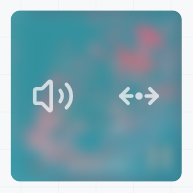
After playback starts, hover over the square to reveal the controls:
-
Drag the volume icon on the left to enter volume adjustment mode, or drag the icon on the right to enter playback position adjustment mode.
-
The controls hide immediately when the pointer leaves the player. They also hide automatically after a few seconds if the pointer stays still over the player.
3. Player API
In v2.x.x, each BBlockPlayer instance provides methods and properties, including writable properties. The descriptions below use the player instance created in the example above.
Expand to view
3.1. Methods
| Method | Description |
|---|---|
player.play() |
Start playback |
player.pause() |
Pause playback |
player.seek(time) |
Seek to the specified position, in seconds |
player.reload(deltaConfig = {}) |
Rebuild the player, overriding the original configuration with the supplied fields. For example, {loop: true, float: "left"} sets loop to true and float to left while retaining other settings. Reloading keeps the player ID, but resets playback state and removes all existing event listeners. The underlying audioElement also changes, so retrieve it again if you need to use it |
player.destroy() |
Destroy the player, remove event listeners, and restore the container's original HTML and inline styles |
player.on(eventName, callback) |
Register an event listener; see below for details |
player.off(eventName, callback) |
Remove a callback for the specified event. Pass the same function reference used when registering it |
player.offAll() |
Remove all event listeners registered through player.on() |
3.2. Properties
| Property | Access | Description |
|---|---|---|
player.volume |
Read/write | Volume, ranging from 0 to 1 |
player.loop |
Read/write | Whether to loop playback. Accepts the boolean values true / false |
player.progressColor |
Read/write | Progress bar color. Accepts a CSS color string or none (background-adaptive color) |
player.progressOpacity |
Read/write | Progress bar opacity, ranging from 0 to 1 |
player.currentTime |
Read-only | Current playback position, in seconds. Use seek() to change the playback position |
player.audioElement |
Read-only | The underlying HTMLAudioElement, which you can use to read native properties such as duration and paused |
player.id |
Read-only | The player's unique ID, as a string |
player.destroyed |
Read-only | Whether the player has been destroyed |
3.3. Global Instance Management
The global bblock object is retained for compatibility with v1.x.x.
| API | Description |
|---|---|
bblock.c(element, config) |
Create and return a BBlockPlayer instance |
bblock.s() |
Scan the page for <bblock> tags and initialize players using their JSON configurations. Returns an array of instances created during this scan. The script automatically scans once each time it runs |
bblock.get(id) |
Get the current player instance by ID. Returns null if it does not exist |
bblock.currentPlayers |
Get all existing players on the current page as an array of [id, player] pairs |
Note: Removing a player element from the current DOM automatically destroys the player (destroy()).
4. Event Binding
Use player.on(eventName, callback) to bind player events. You can register multiple callbacks for the same event, but registering the same function reference multiple times will overwrite the previous registration. Event names are lowercase.
Expand to view supported events
4.1. Native Audio Events
Native audio events such as play, canplay, and timeupdate are bound directly to the underlying <audio> element when registered via player.on. Unlike event listeners added using addEventListener on player.audioElement, listeners registered via player.on are automatically managed and, by default, share the same lifecycle as the player.
4.2. Player Events
The player also emits some events of its own ( *ˊᵕˋ)σ
| Event name | Callback arguments | When it fires |
|---|---|---|
controlsshow |
None | When the controls appear |
controlshide |
None | When visible controls hide |
volumecontrolstart |
None | When volume adjustment mode starts (Unlike the <audio> element's volumechange event, this fires once when the user presses the volume icon to enter adjustment mode, rather than continuously while dragging) |
volumecontrolend |
None | When volume adjustment ends (when returning from the volume adjustment view to the default controls view) |
progresscontrolstart |
None | When playback position adjustment mode starts (as above, this differs from the <audio> element's timeupdate event) |
progresscontrolend |
None | When playback position adjustment ends |
tipshow |
(message, duration) |
When a tip starts appearing. The callback receives the tip text and display duration in milliseconds |
tiphide |
(message, duration) |
When a tip starts hiding. The callback arguments are the same as for tipshow |
destroy |
None | Before the player is destroyed. Also fires when reload() is called |
5. Build It
npm install
npm run build
Build artifacts are written to the ./dist directory:
dist/
├── bblock.classes.json
├── bblock.esm.js
└── bblock.umd.js
6. Thanks
Third-Party Projects and Licenses
This project uses some icons from Lucide Icons, licensed under the ISC License. Thanks to the open-source icon contributors! (´ー∀ー`)
LICENSE
Licensed under the MIT License.
Thanks for using. ( ̄▽ ̄)"